

- Top Page >
- Using Other Devices >
- Optical audio connection
Optical audio connection
Making a Connection
Connect an audio system (e.g. home theatre system) with digital input to the TV using an optical audio cable.
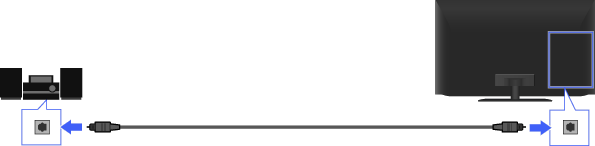
Audio system
TV
Optical audio cable (not supplied)
Steps
After making a connection, press the HOME button, then select
 [Settings] at the bottom of the screen using the
  /
/ buttons.
Select
 [Sound] using the
  /
/ buttons, then press the
  button.
Select [Speakers] using the
/ buttons, then press the button.Select [Audio System] using the
/ buttons, then press the button.Press the HOME button twice to return to the last viewed source.
Turn on the connected audio system, then adjust the volume.
Notes
- You need to configure the [Digital Audio Out] settings according to your audio system.
Jump to the page
