

- Top Page >
- Useful Functions >
- Turning the TV off by monitoring PC input signal
Turning the TV off by monitoring PC input signal
Overview
You can set the TV to turn off automatically when there is no signal from the PC input source for 30 seconds.

Steps
Press the HOME button, then select
 [Settings] at the bottom of the screen using the
  /
/ buttons.
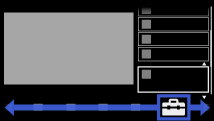
Select
 [System Settings] using the
  /
/ buttons, then press the
  button.
Select [Eco] using the
/ buttons, then press the button.Select [PC Power Management] using the
/ buttons, then press the button.Select [On] using the
/ buttons to enable this function, then press the button.
To return to the last viewed source, press the HOME button twice.
