

- Top Page >
- Configuring Various Settings >
- Setting DivX(R) VOD
Setting DivX(R) VOD
Overview
You can view protected DivX VOD content downloaded and stored on a USB device, by entering the registration code. The registration code is valid only on this TV; once you use the registration code, the content cannot be viewed on other TVs.
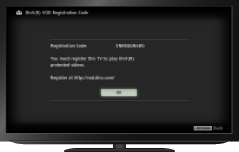
Steps
Press the HOME button, then select
 [Settings] at the bottom of the screen using the
  /
/ buttons.
Select
 [System Settings] using the
  /
/ buttons, then press the
  button.
Select [DivX(R) VOD] using the
/ buttons, then press the button.Select [DivX(R) VOD Registration Code] using the
/ buttons to check the registration code, then press the button.
To return to the last viewed source, press the HOME button twice.
To check the deregistration code
Press the HOME button, then select [Settings] → [System Settings] → [DivX(R) VOD Deregistration Code].
Tips
- A new registration code will be displayed in [DivX(R) VOD Registration Code] after deleting registration via [DivX(R) VOD Deregistration Code].
