

- Top Page >
- Using Internet >
- Using Internet Widgets
Using Internet Widgets
Overview
Widgets are small downloadable applications that provide easy access to interactive content when your TV is connected to the Internet. You can select an activated Widget from the Home Menu to display on the screen.
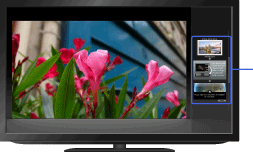
Widgets
Steps
Make a broadband Internet connection.
Press the HOME button, then select
 [Widgets] at the bottom of the screen using the
  /
/ buttons.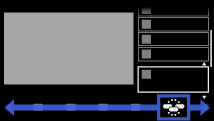
Select the desired Widget to display on the screen using the
 /
/ buttons, then press the
  button.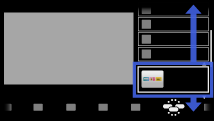
To return to the last viewed source, press the HOME button twice.
To activate additional Widgets
Press the HOME button, select [Widgets] → [Widget Gallery], then the Widget to activate.
To deactivate, while the Widget is displayed, press the OPTIONS button, then select [Deactivate].
Notes
- If you experience difficulties with this feature, check that the Internet connection is set up properly.
- This feature may not be available in some regions/countries.
- Available Widgets depend on your region/country.
- MAC address and IP address are transmitted automatically from the TV to servers while an Internet connection is available. The servers are under the control of Sony, and MAC address will never be transmitted to servers controlled by other parties.
