

- Top Page >
- Useful Functions >
- Saving power by picture brightness
Saving power by picture brightness
Overview
You can reduce power consumption by changing the picture brightness.

Dark picture
(High power saving)
(High power saving)
Bright picture
(Low power saving)
(Low power saving)
Steps
Press the HOME button, then select
 [Settings] at the bottom of the screen using the
  /
/ buttons.
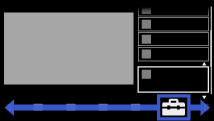
Select
 [System Settings] using the
  /
/ buttons, then press the
  button.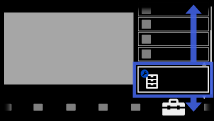
Select [Eco] using the
/ buttons, then press the button.Select [Power Saving] using the
/ buttons, then press the button.Select the desired option using the
/ buttons, then press the button.
To return to the last viewed source, press the HOME button twice.
Available Options
- [Picture Off]
- Maximum power saving. Picture turns off; sound remains on.
- [High]
- High power saving. Picture darkens.
- [Low]
- Low power saving. Picture darkens slightly.
- [Off]
- No power saving.
