

- Top Page >
- Parts Description >
- Bottom
Bottom
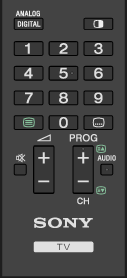
 +/– (Volume)
Press to adjust the volume.
 (Muting)
Press to mute the sound. Press again to restore the sound.
- PROG +/–/
 /
/
In TV mode: Press to select the next (+) or previous (–) channel.
In Text mode: Press to select the next (
) or previous () page.
- AUDIO
Press to change the dual sound mode.
For digital mode, press to change the language for the programme currently being viewed.
