

- Top Page >
- Parts Description >
- Upper
Upper
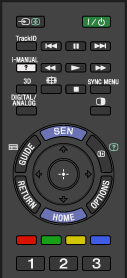
- 3D
Press to select the 3D display mode.
 (Wide mode)
Press to select the wide mode.
- SYNC MENU
Press to display the “BRAVIA” Sync Menu to operate a connected “BRAVIA” Sync-compatible device.
- DIGITAL/ANALOG
Press to switch between digital and analogue mode.
When viewing pictures from connected device, press to return to the last viewed TV mode.
 (Twin picture/PIP)
Press to display two pictures simultaneously.
