

Sony

BRAVIA

i-Manual

  • Print
  • Font Size
  • Basic Operations
  • Parts Description
  • Watching TV
  • Using Other Devices
  • Using “BRAVIA” Sync Devices
  • Useful Functions
  • Using Internet
  • Using Home Network
  • Configuring Various Settings
  • Troubleshooting
  • How to Use Bookmarks
  • Top Page >
  • Watching TV >
  • Audio

Top Page > Watching TV > Changing Display/Audio > Audio

Audio

Steps

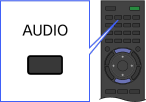
While watching a programme, press the AUDIO button repeatedly to select the desired audio signal.
Tips

  • You can also change the sound mode in the Home Menu. Press the HOME button, select [Settings] → [Sound] → [Dual Sound], then the desired option.

Top of Page

List of Contents
© 2013 Sony Corporation