Sony

BRAVIA

i-Manual

  • Print
  • Font Size
  • Basic Operations
  • Parts Description
  • Watching TV
  • Using Other Devices
  • Using “BRAVIA” Sync Devices
  • Useful Functions
  • Using Internet
  • Using Home Network
  • Configuring Various Settings
  • Troubleshooting
  • How to Use Bookmarks
  • Top Page >
  • Watching TV >
  • Subtitles

Top Page > Watching TV > Changing Display/Audio > Subtitles

Subtitles

Steps

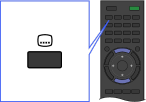
  1. While watching a programme with subtitles, press the button.

  2. Select the desired language or off using the / buttons, then press the button.

To close this list, press the RETURN or button.

Tips

  • You can also change the subtitles in the Options Menu. Press the OPTIONS button, select [Subtitle language] using the / buttons, then the desired option.

Top of Page

List of Contents
© 2013 Sony Corporation