

- Top Page >
- Useful Functions >
- Saving power by automatically adjusting the backlight drive
Saving power by automatically adjusting the backlight drive
Overview
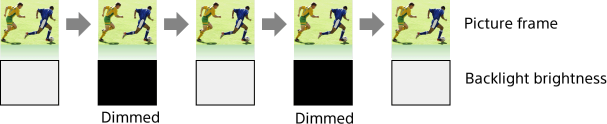
The TV adjusts the backlight brightness according to the [Scene Select] setting. You can save power by enabling this function.
Example of backlight adjustment:
Steps
Press the HOME button, then select [Settings] using the
 /
/ buttons.
Select
 [System Settings] using the
  /
/ buttons, then press the
  button.
Select [Eco] using the
/ buttons, then press the button.Select [Scene Select Sync] using the
/ buttons, then press the button.Select [On] using the
/ buttons to enable this function, then press the button.
To return to the last viewed source, press the HOME button twice.
