

- Top Page >
- Parts Description >
- Top
Top
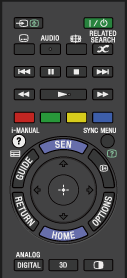
 /
/ (Input select/Text hold)
In TV mode: Press to select the connected device input.
In Text mode: Press to hold the current page.
 (TV standby)
Press to turn on or to turn off the TV (standby mode).
 (Subtitle setting)
Press to turn subtitles on or off (when the feature is available).
- AUDIO
Press to change the dual sound mode.
For digital mode, press to change the language for the programme currently being viewed.
 (Wide mode)
Press to select the wide mode.
 RELATED SEARCH
When the TV is connected to the Internet, you can search for related content while watching various content on the TV. (What you can search depends on your region/country or other circumstances.)
