

- Top Page >
- Using Internet >
- Performing initial set-up
Performing initial set-up
Making a Connection
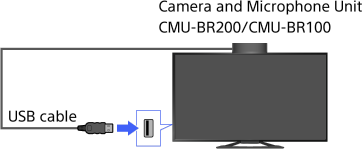
Enjoy widescreen video calls by connecting the optional Camera and Microphone Unit CMU-BR200/CMU-BR100.
Attach the camera to the TV, then connect the USB cable to the TV’s USB port. For details on how to attach the camera, refer to the instruction manual supplied with the camera.
Steps
Make a broadband Internet connection.
Press the HOME button, then select [Applications] using the
 /
/ buttons.
Select [All Applications] using the
 /
/ buttons, then press the
  button.
Select [Skype] using the
/// buttons, then press the button.Follow the on-screen instructions to create your account.
To return to the last viewed source, press the HOME button twice.
About the status icons in the Home Menu
When [Skype] in [Applications] of the Home Menu is selected, a status icon appears next to [Skype], indicating the status of your Skype account.
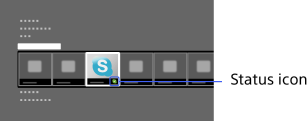
Each status icon indicates as follows:
 : Auto Sign in error,
  : Online,
  : Away,
  : Do Not Disturb,
  : Invisible
Tips
- For more information on Skype, please visit
http://www.Skype.com/
- This product includes SkypeKit 3.7 (c) 2003-2012, Skype Patents Pending Skype, associated trade marks and logos and the “S” logo are trade marks of Skype. Although this product has been tested and met our certification standards for audio and video quality, it is not endorsed by Skype, Skype Communications S.a.r.l. or any of their related companies.
Notes
- You can use only the optional Camera and Microphone Unit CMU-BR200/CMU-BR100. Other models are not supported.
- No emergency calls. Skype is not a replacement for your telephone and can’t be used for emergency calling.
- Skype may not be available while some other applications are being used.
- Use of a wireless network connection may cause audio/image degradation.
- Connect the optional Camera and Microphone Unit directly to the TV’s USB port. Do not connect it via a USB hub.
- Audio and video calls are free to other people on Skype. For other Skype services such as low cost calls to mobile phones and landlines, Skype Credit or a subscription is required.
- The sound quality of the microphone may deteriorate in a noisy environment.
- A ringtone does not sound from the HDMI Audio Return Channel (ARC) and optical digital audio output. To sound a ringtone, press the HOME button, then select [Settings] →
 [Sound] → [Speakers] → [TV Speakers].
