

- Top Page >
- Parts Description >
- Lower
Lower
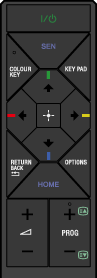
- RETURN/BACK

Press to return to the previous screen, or exit from a menu.
- OPTIONS
Press to display a list of convenient functions and menu shortcuts. The menu items vary based on the current input and/or content.
- HOME
Press to display the TV Home Menu.
 +/– (Volume)
Press to adjust the volume.
- PROG +/–/
 /
/
In TV mode: Press to display the channel selection screen.
In Text mode: Press to select the next (
) or previous () page.
