

- Top Page >
- Parts Description >
- Upper
Upper
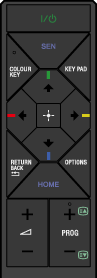

Press to turn on or to turn off the TV (standby mode).
- COLOUR KEY/COLOUR KEY Indicator
Press to light up the indicator, then the
 /
/ /
/ /
/ buttons are available as colour buttons.
If the COLOUR KEY button is pressed again when the colour buttons are available, the indicator turns off and the
/// buttons become available instead.
- SEN
Press to display Sony Entertainment Network.
- KEY PAD
Displays the screen keyboard.
Buttons on the screen keyboard work the same as those on the remote.
- ////

Press to select/confirm a highlighted item.
When the COLOUR KEY button is pressed, the indicator lights up, then the
/// buttons are available as colour buttons.
