

- Top Page >
- Parts Description >
- Right
Right
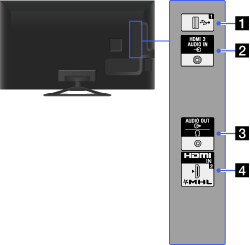
 USB 1
USB 1
You can enjoy photo, music and video files stored on a USB device.
 HDMI 3 AUDIO IN
This input can be used as an HDMI 3 analogue audio input.
When connecting a device that has DVI jack (socket), use its analogue audio out jacks (sockets).
 AUDIO OUT/
Connect with an audio cable or headphones. You can listen to TV sound through your stereo system or headphones.
To set the sound output for headphones or an external audio system, press the HOME button, then select [Settings] →
 [Sound] → [Headphone/Audio Out].
- When you set [Audio Out] in [Headphone/Audio Out], select [Fixed] or [Variable], press the HOME button, then select [Settings] → [Sound] → [Audio Out].
- When you set [Audio Out] in [Headphone/Audio Out], select [Fixed] or [Variable], press the HOME button, then select [Settings] →
- HDMI IN 2/MHL
HDMI (High-Definition Multimedia Interface) provides an uncompressed, all-digital audio/video interface between this TV and any HDMI-equipped audio/video device. You can also connect your MHL device using an MHL cable. In addition, when you connect device that is compatible with “BRAVIA Sync Control”, communication with the connected device is supported.
- Be sure to use an authorised HIGH SPEED HDMI cable bearing the HDMI logo.
- If connecting a digital audio system that is compatible with Audio Return Channel (ARC) technology, use HDMI IN 1 on the bottom of the TV. If not, an additional connection with DIGITAL AUDIO OUT (OPTICAL) is necessary.
- If the device has a DVI jack (socket), connect it to HDMI IN 3 through a DVI - HDMI adaptor interface (not supplied), and connect the device's audio out jacks (sockets) to HDMI 3 AUDIO IN.
