

- Top Page >
- Parts Description >
- Right
Right
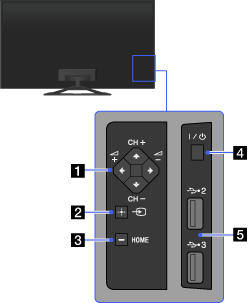
- CH +/– (Channel)/
 /
/ ,
,  +/– (Volume)/
 /
/
Press to select the next (+) or previous (–) channel.
Press to adjust the volume.
- In the TV Home Menu, these buttons will work as ///.
- In the TV Home Menu, these buttons will work as
 (Input select)/
 (Select/Confirm)
Press to display a list of inputs.
To select the connected device input, press this button repeatedly.
- In the TV Home Menu, this button will work as (select/confirm).
- In the TV Home Menu, this button will work as
- HOME
Press to display the TV Home Menu.
 (Power)
Press to turn on the TV or to enter standby mode.
 USB 2/3
You can enjoy photo, music and video files stored on a USB device.
