- Top Page >
- Troubleshooting >
- Remote Symptoms
Remote Symptoms
Remote does not operate.
- Press a button on the TV to determine if the problem is with the remote or not.
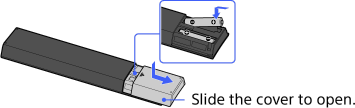
- Check the polarity of the batteries or replace the batteries.
- Point the remote at the remote control sensor located at the front of the TV.
- Keep the remote control sensor area clear from obstacles.
- Fluorescent light can interfere with remote operation; try turning off any fluorescent light.