

- Top Page >
- Using Other Devices >
- MHL Device
MHL Device
Making a Connection
Connect your MHL device (e.g. smartphone, tablet) with MHL output to the TV's HDMI IN 2/MHL port, using an MHL cable.
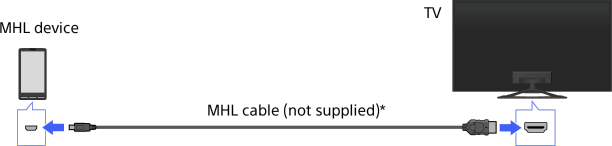
* Be sure to use an authorised MHL2 cable bearing the MHL logo.
Steps
After making a connection, press the HOME button, then select [Connected Devices] using the
 /
/ buttons.
Select [HDMI 2/MHL] using the
 /
/ buttons, then press the
  button.
To switch to MHL input automatically
Press the HOME button, then select [Settings] →  [External Inputs] → [BRAVIA Sync Settings] → [Auto Input Change(MHL)] → [On]. (Depending on the MHL device, input may not be switched.) If the TV is in standby mode, it will not switch automatically. Perform steps 1 and 2 above.
To charge an MHL device
Press the HOME button, then select [Settings] → [External Inputs] → [MHL Charging during Standby] → [On].
Tips
- When the TV is on, an MHL device can be charged from the TV using an MHL cable.
- When the TV is in standby mode, if [MHL Charging during Standby] is set to [On], an MHL device can be charged from the TV using an MHL cable.
