

- Top Page >
- Using Other Devices >
- Deleting recorded content
Deleting recorded content
Overview
You can select recorded content from a list, and delete it.
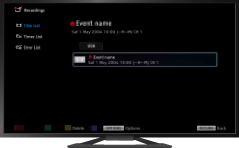
Steps
Press the HOME button, then select [TV] using the
 /
/ buttons.
Select
 [Recordings] using the
  /
/ buttons, then press the
  button.
Select [Title List] using the
/ buttons, then press the button.Select the target USB HDD device using the
/ buttons, then press the button.Select the content using the
/ buttons.Press the OPTIONS button.
Select [Delete] using the
/ buttons, then press the button.Select [One]/[Selective]/[All] using the
/ buttons, then press the button.
Tips
- You can also select multiple contents and delete them at one time.
