


Parts and Controls on the Front
Describes the features on the front of the VAIO computer, such as buttons and indicator lights.
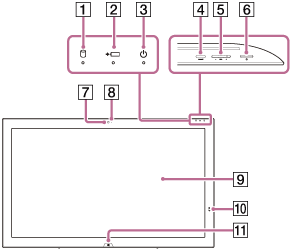
-
 Disc drive indicator
 -
 Charge indicator (Charge Indicator Status List)
 -
 Power indicator (Turning On Your VAIO Computer)
 -
ASSIST button (About the ASSIST Button)
-
VOL (Volume) buttons
-
Power button (Turning On Your VAIO Computer)
-
Built-in camera (Using the Built-in Camera)
-
Built-in camera indicator (Using the Built-in Camera)
-
Touch screen (How to Use the Touch Screen (Touch screen equipped models))
-

 Touch mark (Using NFC/One-touch functions (NFC supported models))
 -
 Windows button
Notes on the LCD screen
The LCD screen is manufactured using high-precision technology. You may, however, see tiny black points and/or bright points (red, blue, or green) that continuously appear on the LCD screen. The ratio of defective pixels to all available pixels of the LCD screen is less than 0.0006 %. Also, depending on the viewing angle, uneven stripes of changes in color and luminance may appear. These are normal results of the LCD screen construction and do not indicate a malfunction. Take note that returns and replacements are not accepted.