To listen to a transferred channel on your “WALKMAN”
- Select the Music Unlimited icon
 on the Home menu of your “WALKMAN.”
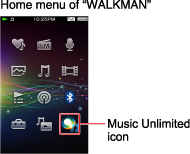
- Select [Channels] on the Music Unlimited menu
on your “WALKMAN.”
The list of the transferred channels appears. - Select the channel you want to listen to.
Playing of the songs from the selected channel starts.
Like/Dislike option
You can choose the [Like] or [Dislike] option for the song being played. The selected option information will be transferred to Music Unlimited when you synchronize channels with Music Unlimited service next time, to reflect your preferences to the channels.
To listen to transferred songs on your “WALKMAN”
- Select the Music Unlimited icon on the Home menu of your “WALKMAN.”
- Select [My Library] on the Music Unlimited menu.
- Select [All songs], [Album], [Artists], or [Playlist].
The songs transferred from My Library are sorted with the selected method. - Select the song you want to listen to.
Playing of the selected song starts.