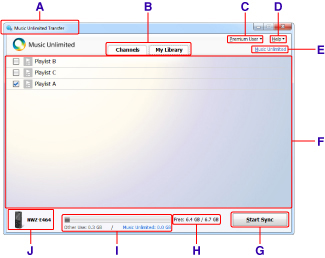
A: Music Unlimited Transfer icon and application name
Displays system menus.
You can check the version of Music Unlimited Transfer by clicking “About Music Unlimited Transfer.”
B: Channels tab/My Library tab
Switches between the Channels window and the My Library window.
C: Premium User button
Displays your subscription type.
Click the button to display the Sync menu. For details on menu items, see “Menu descriptions.”
D: Help button
Displays the Help menu. For details on menu items, see “Menu descriptions.”
E: Music Unlimited button
Starts up a browser and links to the Music Unlimited web site.
F: List of playlists
Displays the playlists that you have created on Music Unlimited.
If no playlists exist, a message appears on the screen. Create playlists following the messages.
G: Start Sync/Stop Sync button
Starts or stops synchronization with your “WALKMAN.”
H: Free space/total size / progress status
Displays the free space remaining and the total size of momory available on the connected “WALKMAN.”
Shows the progress status in percentage.
I: Size calculation bar/progress bar
Shows the size of various types of data and the free space available on the connected “WALKMAN” in different colors. For details, see “Description of the size calculation bar.”
Shows the progress of synchronization.
J: “WALKMAN” icon and the model name
Shows the model name and the status of the connected “WALKMAN.”
For details, see “Description of the “WALKMAN” icons.”