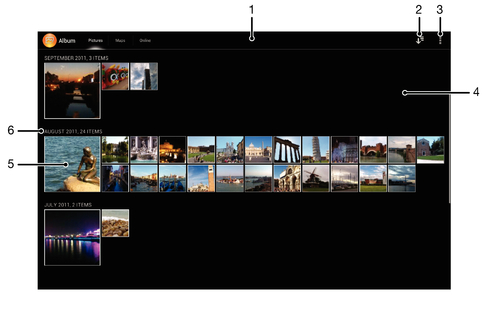
| 1 |
Grid view of photos and videos. |
| 2 |
Switch to a list view of all folders containing pictures and videos saved on your device. |
| 3 |
View menu options. |
| 4 |
Scroll up or down to view content. |
| 5 |
Tap a photo or video to view it. |
| 6 |
The date and number of items in the group below. |
| 7 |
List view of all folders containing pictures and videos saved on your device. |
| 8 |
Folder containing all pictures taken with your device's camera. |
| 9 |
Folder containing all videos taken with your device's camera. |
| 10 |
All other folders containing pictures and/or videos that you've downloaded or copied to your device. |
| 11 |
Tap to return to grid view in the Pictures tab. |


 Go to Page Top