Rolling shutter reduction
Rolling shutter refers to the phenomenon where unique distortions occur in captured images when photographing or filming moving subjects.
Using the Adjust clip plugin of the Catalyst Prepare Plugin, You can reduce the rolling shutter distortion that occurs while shooting. Distortions caused by the movement of objects cannot be corrected.
To use the Rolling shutter reduction function, the clip must contain image stabilization metadata.
-
Load into the project panel and drag the clip to the timeline panel.
Only clips with stabilization metadata can be used.
For information on the camera settings required to enable corrections using metadata, visit https://www.sony.net/catalyst/help.
-
Dragging the Adjust clip from the Catalyst Prepare Plugin in the effects to the clip on the timeline will add the Adjust clip.
-
Select the Apply check box for Rolling shutter reduction to enable Rolling shutter reduction.
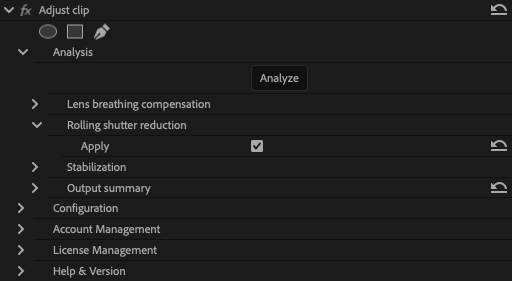
Rolling shutter reduction is only applied to distortion caused by camera movement.
-
Click the Analyze button to analyze the selected clip. The results of the correction will be reflected in the preview display.
After analysis, the corrected resolution will be displayed in the Output summary section.