


Operations for audio podcast playback
You can use the following operations in the audio podcast screen.
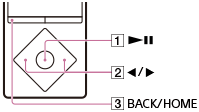
Play/pause
Press the button ( ).
).
Fast forward/fast rewind
Press and hold the button ( ).
).
Go to the start of the episode being played
Press the button ().
Pressing either the button () returns to the start of the episode being played.
Go to the next episode
Press the button ( ) to display the episode list and select the episode you want to play.
Return to the list screen
Press the button ().
Hint
- Your Walkman automatically enters playback standby if there is no operation for a fixed period of time while paused.