


Using the HOLD switch
You can use the HOLD switch to prevent the buttons from being pressed and operated accidentally.
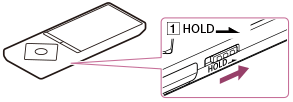
- Slide the switch (
 ) in the direction of the arrow.
The HOLD function is enabled and all operation buttons are disabled.
) in the direction of the arrow.
The HOLD function is enabled and all operation buttons are disabled.
Hint
- Slide the switch () in the opposite position to release the HOLD function.
-
 flashes at the top of the screen if buttons are pressed while the HOLD function is enabled.