


Operations for video podcast playback
You can use the following operations in the video podcast screen. Your Walkman uses landscape display.
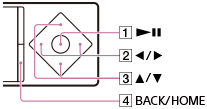
Play/pause
Press the button ( ).
).
Fast forward/fast rewind
Press the button ( ) during playback and press the button () at the desired point. You can also press and hold the button () during playback or while paused and release it at the desired point.
Press the button () during fast forward or fast rewind to change between three fast forward and fast rewind speeds (10x, 30x and 100x).
If you fast-forward to the end of the episode, playback pauses. If you fast-rewind to the beginning of the episode during playback, playback restarts automatically. If you fast-rewind to the beginning of the episode while paused, playback remains paused. These buttons may not work as described above depending on the episode.
Go back/forward slightly
Press the button () while paused.
Go to the previous or next scene or chapter
Press the button ( ).
).
If no chapters are set for the video, the scene jumps in five minute increments.
Return to the list screen
Press the button ( ).
).
Hint
- Your Walkman automatically enters playback standby if there is no operation for a fixed period of time while paused.
- The speed of fast forward/fast rewind while paused varies according to the length of the episode.