


Installing the “NFC Easy Connect” app on an Android smartphone
Download and install the “NFC Easy Connect” app on your Android smartphone.
-
Search for “NFC Easy Connect” at Sony Style.
Access the following website.
http://www.sonystyle.com.cn/app/download/NFC/index.htm
Otherwise, if you have an application to read 2D code, access the website using the 2D code below.
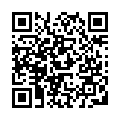
- Install the “NFC Easy Connect” app on the smartphone by following the on-screen instructions.
- Start the “NFC Easy Connect” app on the smartphone.
Make sure that the app screen is displayed.