
 Before Use
Shooting still images
-
Set the mode dial to
 (Intelligent Auto).

-
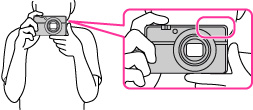
Hold the camera steady as illustrated.
-
Do not cover the flash with your fingers.
-
Press the shutter button halfway down to focus.
 or
or  ) lights.
 lights: Image is in the focus. lights: Image is in the focus. The focused position will change to suit the motion of the subject.
 lights: The camera is in the progress of focusing. flashes: The focusing is failed.
-
The shortest shooting distance is approximately 5 cm (0.16 ft) (W), 55 cm (1.8 ft) (T) (from the lens).
-
Press the shutter button fully down.
-
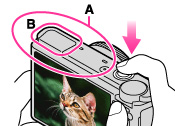
Do not cover part (A), shown in the illustration.
-
When using the flash, the flash (B) pops up automatically.
 If you shoot a still image of a subject that is difficult to focus on
-
When the camera cannot focus automatically, the focus indicator flashes and the beep does not sound. Either recompose the shot or change the focus setting. [Details]
-
Focusing may be difficult in the following situations:
-
It is dark and the subject is distant.
-
The contrast between the subject and the background is poor.
-
The subject is seen through glass.
-
The subject is moving quickly.
-
There is reflective light or shiny surfaces.
-
The subject is backlit or there is a flashing light.
