
 Before Use
Program Auto
Allows you to shoot with the exposure adjusted automatically (both the shutter speed and the aperture value). Also you can select various settings using the menu.
-
Set the mode dial to
 (Program Auto).
-
Shoot with the shutter button.
Program shift
You can change the aperture (F value) and shutter speed combination while keeping the exposure fixed when flash is set to [Flash Off].
-
Turn the control wheel.
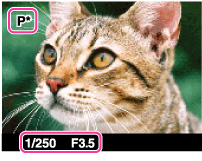
“” on the screen changes to “ ” and the shooting mode changes to program shift.
” on the screen changes to “” and the shooting mode changes to program shift.-
Turn the control wheel to select the aperture (F value) and shutter speed combination.
-
Shoot with the shutter button.
To cancel program shift, turn the control wheel to return the indication to “”.
”.
Notes
-
According to the brightness of the environment, the program shift may not be used.
-
Set the mode dial to the one other than “
” or turn off the power to cancel the setting you made.
-
When the brightness changes, the aperture (F value) and shutter speed also change while maintaining the shift amount.
-
When [Flash Mode] setting is changed, program shift is canceled.
Related Topic
