

- Top Page >
- Using Other Devices >
- Component video connection
Component video connection
Making a Connection
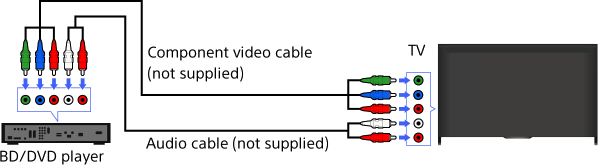
If your BD/DVD player has component video jacks, connect it to the TV, using a component video cable and an audio cable.
Steps
After making a connection, turn on the connected BD/DVD player.
Press the INPUT button repeatedly to select the connected BD/DVD player.
(When using the Touchpad Remote Control, press the Control Bar (
 ), slide the touchpad to highlight the INPUT button, press the touchpad, slide the touchpad to highlight the connected BD/DVD player, then press the touchpad.)
Start playback on the connected BD/DVD player.
