

- Top Page >
- Parts Description >
- Front
Front
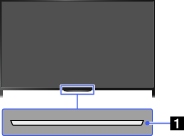
- Sensors and Illumination
- Remote control sensor
Receives signals from the remote control.
Point the remote control at the Sony logo to operate the TV.
Do not place anything near the sensor. Doing so may affect its function.
- Light sensor
Senses the room light level and adjusts the screen brightness accordingly.
Do not place anything near the sensor. Doing so may affect its function.
Illumination LED
The Illumination LED lights up or blinks in response to remote control operations and lights up in different colors according to the status of the TV.

Blinking
(Blinking speed depends on status)- The TV is turned on
The TV is receiving an incoming call *2
The TV is in Picture off mode
Software update is in progress 
Blinking- When the TV and a mobile device (e.g. smartphone) are connected wirelessly

*1- During recording (including SCART REC) or the TV is in pause mode *2

*1- The following Timer functions are set:
On Timer, Sleep Timer, Reminder (*2), REC Timer (*2)
- For simultaneous conditions, the upper condition in the table has priority.
- The Illumination LED does not light up when the TV is in standby mode, except when a recording is in progress or the timer is set.
*1: If [Simple Response] is selected in [Illumination LED], the illumination LED does not light continuously but blinks as feedback for operations.
*2: This function is available depending on your region/country.
