

- Top Page >
- Watching TV >
- Selecting Channels
Selecting Channels
Overview
You can select channels using Discover, the Home Menu, or number buttons.
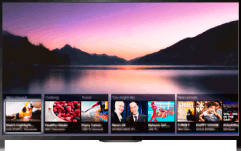
Selecting channels using Discover
Press the DISCOVER button to launch the Discover app.
(When using the Touchpad Remote Control, touch and slide up your finger from the bottom area.)
Use the
 /
/ buttons to select the desired TV broadcast system.
(When using the Touchpad Remote Control, flick up/down.)
Use the
 /
/ buttons to select the desired thumbnail, then press the
  button.
(When using the Touchpad Remote Control, slide left/right to highlight the thumbnail, then press the touchpad to select.)
Selecting channels using the Home Menu
Press the HOME button.
Select
 [Channel] at the top of the Home Menu.
Select the desired broadcast system using [Channel List] at the bottom of the Home Menu.
Select the desired channel.
Selecting channels using the number buttons
Press the number button(s) to select a channel.
For channel numbers 10 and above, press the second digit number button quickly after the first digit.
