
Sony

BRAVIA

i-Manual

  • Print
  • Font Size
  • Basic Operations
  • Parts Description
  • Watching TV
  • Enjoying Movies/Music/Photos
  • Using Internet Services and Applications
  • Watching TV with Friends Far and Near
  • Using Other Devices
  • Using BRAVIA Sync Devices
  • Useful Functions
  • Connecting to the Internet
  • Using Home Network
  • Configuring Various Settings
  • Troubleshooting
  • How to Use Bookmarks
  • Top Page >
  • Parts Description >
  • Lower

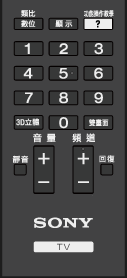
Top Page > Parts Description > Remote Control > Lower

Lower

  • 數位/類比

    Press to switch between digital and analogue mode.

    When viewing pictures from a connected device, press to return to the last viewed TV mode.

  • 顯示

    Press to display information.

  • 功能操作教學

    Press to display the on-screen instruction manual (this manual).

  • Number buttons

    Press to select channels.

  • 3D立體

    Press to select the 3D display mode.

  • 雙畫面

    Press to display two pictures simultaneously.

Top of Page

List of Contents
© 2014 Sony Corporation