

- Top Page >
- Parts Description >
- Top
Top
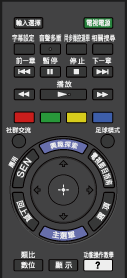
- 輸入選擇
Press to display a list of inputs.
- 電視電源
Press to turn on or to turn off the TV (standby mode).
- 字幕設定
Press to turn subtitles on or off (when the feature is available).
- 音聲多重
In analogue mode: Press to change the MTS mode.
In digital mode: Press to change the language for the programme currently being viewed.
- 同步操控選單
Press to display the BRAVIA Sync Menu to operate a connected BRAVIA Sync-compatible device.
- 相關搜尋
When the TV is connected to the Internet, you can search for related content while watching various content on the TV. (What you can search depends on your region/country or other circumstances.)
