

- Top Page >
- Parts Description >
- Lower
Lower
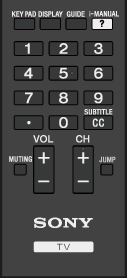
- KEY PAD
Press to open the Screen Key Pad at the top of the TV screen. You can use the
 /
/ buttons to operate the Screen Key Pad.
- DISPLAY
Press once to display information about the channel/program/input you are viewing. Press again to exit.
- GUIDE
Press to display the digital program guide.
The Guide feature may not be available in some regions/countries.
 i-MANUAL
Press to display the on-screen instruction manual (this manual).
- 0-9
Press the 0-9 buttons to select a channel.

Use with the 0-9 buttons to select digital channels. For example, to enter 2.1, press 2,
, 1.
- CC/SUBTITLE
Press to turn closed captions/subtitles on or off (when the feature is available).
