

- Top Page >
- Using Other Devices >
- USB Device
USB Device
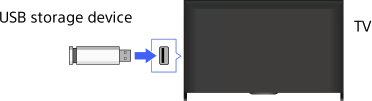
Making a Connection
Connect a USB storage device to enjoy photo, music and video files stored in the device.
Steps
After making a connection, turn on the connected USB device.
Press the HOME button, then select
 [Media Server].
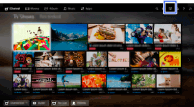
Select [USB] → the folder or file from the list.
If you select a folder, select the desired file.
Playback starts.
To check the supported file formats
Notes
- USB viewer supports FAT16, FAT32 and exFAT file systems.
- When connecting a Sony digital still camera to the TV with a USB cable, USB connection settings on your camera need to be set to [Auto] or [Mass Storage] mode.
- If your digital still camera does not work with your TV, try the following:
- Set the USB connection settings on your camera to [Mass Storage].
- Copy the files from the camera to a USB flash drive, then connect the drive to the TV.
- [Face Zoom] and [Expanded] in the option menu of [Display Size] may not work for some image files.
- Only panoramic JPEG files in the following horizontal/vertical sizes can be scrolled. (If the JPEG file is edited on a PC, etc., scrolling may not be possible.)
- - For horizontal scroll: 4912/1080, 7152/1080, 3424/1920, 4912/1920, 12416/1856, 8192/1856, 5536/2160, 3872/2160, 10480/4096, 11520/1080
- - For vertical scroll: 1080/4912, 1080/7152, 1920/3424, 1920/4912, 1856/12416, 1856/8192, 2160/5536, 2160/3872, 4096/10480, 1080/11520
- Video files are located in the following folder structure (hierarchal position):
/AVCHD/BDMV/STREAM/00000.MTS
/PRIVATE/AVCHD/BDMV/STREAM/00000.MTS
/MP_ROOT/100ANV01/MAHA0001.MP4 - Avoid losing your files by backing up all your media files stored on a USB device. Sony cannot accept responsibility for lost or damaged data stored on a USB device.
- Depending on the file, playback may not be possible even when using the supported formats.
