
 Operation Search
Delete button
Allows you to select unwanted images for deletion.
You can also delete images from the MENU button. [Details]
-
Press the
 (Playback) button to switch to playback mode.
-
 /
/ (Delete) button
  desired mode
 on the control wheel
|
All Images on This Date
All in This Folder
All AVCHD view files
|
Deletes all images in the selected date range or folder, or all AVCHD movies at once.
Press [OK]
after step 2. |
|
Multiple Images
|
Allows you to select and delete multiple images.
Do as the following after step 2.
A
 mark is attached to the selected image. mark is attached to the selected image.Repeat the above steps until there are no more images to be deleted. Select an image with a
mark again to release the mark. MENU
[OK]
MENU
[OK]
|
|
This Image
|
Deletes the currently displayed image.
|
|
All Imgs in This Burst Group
|
Deletes all images in the selected burst group at once.
Press [OK]
after step 2. |
|
All but This Image
|
Deletes all images in a burst group except the selected image in Display Burst Group mode.
Press [OK]
after step 2. |
|
Cancel
|
Cancels the deletion.
|
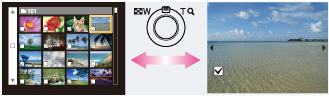
 You can switch between index and single-image mode when selecting images
Turn the W/T (zoom) lever to the T side ( ) in index mode to return to single-image mode, and turn the lever to the W side (
 ) in single-image mode to return to index mode.
) in index mode to return to single-image mode, and turn the lever to the W side () in single-image mode to return to index mode.-
You can also switch between index and single-image mode in [Protect], [Send by TransferJet] or [Print (DPOF)].
Note
-
When the internal memory is used to record images, [View Mode] is set to [Folder View].
Related Topic
