
 Getting Started
What you can do with “WALKMAN”
Your “WALKMAN” incorporates various functions. This page introduces some of its major features to you.
You need to transfer music from a computer to your “WALKMAN.”
Enjoying music transferred from a computer
To enjoy music, use bundled software (Content Transfer) or supported software (Windows Media Player) to transfer from a computer to the player. For how to install the bundled software, refer to “Quick Start Guide.”
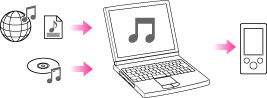
 Music
Music
There are several ways to transfer music to the player. See [Details] for how to transfer your favorite songs to the player. After transferring, see [Details] for how to play them back.
Enjoying “SensMe™ Channels”
 Playing “SensMe™ Channels”
“SensMe™ Channels” automatically picks up songs to fit the themes of channels. You can play songs according to your mood, activity, time of the day, and so on. See [Details] for how to use “SensMe™ Channels.”
