
 Getting Started
Using the music option menu
You can bring up the music option menu by pressing the OPTION/PWR OFF button on the music list or on the music playback screen. For details on how to use the option menu, see [Details].
The option items shown on the option menu vary depending on the screen from which you bring it up. See the reference page for settings and usage.
Option items appearing on the album list screen
|
Option items
|
Description/reference page
|
|
[Album Display]
|
Selects the album list format [Details].
|
Option items appearing on the music playback screen
|
Option items
|
Description/reference page
|
|
[Play Mode]
|
Sets the play mode [Details].
|
|
[Playback Range]
|
Sets the playback range [Details].
|
|
[Display Lyrics]
|
Displays the lyrics of the playing song [Details].
|
|
[Equalizer]
|
Customizes the sound quality [Details].
|
|
[VPT (Surround)]
|
Customizes the [VPT (Surround)] settings [Details].
|
|
[Add to Wishlist/Remove from Wishlist]
|
Adds a song to the wish list to purchase it on the service corresponded software. When a song registered in the wish list is played,
 appears in the music playback screen [Details]./ Removes the song from the wish list. appears in the music playback screen [Details]./ Removes the song from the wish list. |
|
[Detailed Info]
|
Displays detailed information of a song, such as playing time, audio format, bit rate, and file name [Details].
|
|
[Add to Bookmark]
|
Adds the playing song to a bookmark list [Details].
|
|
[Remove from Bookmark]
|
Removes the playing song from a bookmark list [Details].
|
Option items appearing on the music list screen
|
Option items
|
Description/reference page
|
|
[Add to Bookmark]
|
Adds the song to a bookmark list [Details].
|
|
[Remove from Bookmark] (*1)
|
Removes the song from a bookmark list [Details].
|
|
[Edit Song Order] (*1)
|
Rearranges songs in a bookmark list [Details].
|
(*1) These options appear on the music list of a bookmark list only.
Option items appearing on the [Bookmark] screen
|
Option items
|
Description/reference page
|
|
[Clear Bookmark List]
|
Removes all songs in the bookmark list [Details].
|
Displaying the detailed information screen [Detailed Info]
-
From the music playback screen, press the OPTION/PWR OFF button to bring up the option menu.
-
Select [Detailed Info].
Detailed information screen
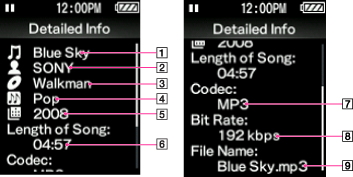
-
Song name
-
Artist name
-
Album title
-
Genre
-
Release year
-
Length of Song
-
Codec
While playing back copyright protected songs, [Secured] appears.
-
Bit rate
While playing back variable bit rate songs, [VBR] is shown.
-
File name
