
 Getting Started
Browsing and using the podcast screen
You can bring up or dismiss the control buttons by tapping the screen. If there is no operation for a while, they disappear.
You can tap the objects such as control buttons on the screen to operate your “WALKMAN.” Also, you can use the  /
/ /
/ buttons on the body of your “WALKMAN” to operate.
// buttons on the body of your “WALKMAN” to operate.Audio podcast playback screen
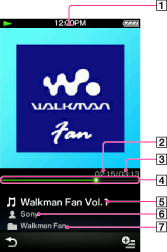
-
Information area
-
Elapsed time
-
Total time
-
Seek Slider
-
Episode name
-
Artist name
-
Podcast name
Operations on the audio podcast playback screen
|
To (Screen indication)
|
Do this
|
|
Play (
 )/pause ( )/pause ( ) (*1) ) (*1) |
|
|
Fast forward (
 )/fast rewind ( )/fast rewind ( ) ) |
|
|
Find the beginning of the episode (*2)
|
|
|
Move to any point in a song
|
Drag the indicator (playback point) along the Seek Slider. The playback begins at the point of the indicator.
|
|
Return to the list screen
|
Tap
 [Back]. [Back]. |
(*1) During pause, if there is no operation for a while, your “WALKMAN” automatically enters standby mode.
(*2) Both of the / buttons find the beginning of the episode. To play back the next episode, select [Back] to display the episode list to select the desired episode.
/ buttons find the beginning of the episode. To play back the next episode, select [Back] to display the episode list to select the desired episode.Video podcast playback screen

-
Information area
-
Total time
-
Seek Slider
-
Elapsed time
These indications disappear after a while.
Operations on the video podcast playback screen
|
To (Screen indication)
|
Do this
|
|
Play (
)/pause () (*1) |
|
|
Fast forward (
)/fast rewind () (*2) (*3) |
|
|
Fast forward (
)/fast rewind () during pause (*5) |
|
|
Move to the previous scene (*6) (
)/move to the next scene (*6) () |
|
|
Rewind slightly/forward slightly
|
Tap
 (rewind)/ (rewind)/  (forward) during pause. (forward) during pause. |
|
Move to any point in a video
|
Drag along the Seek Slider to move the indicator (playback point). The playback begins at the point of the indicator.
|
|
Return to the list screen
|
Tap
[Back]. |
(*1) During pause, if there is no operation for a while, your “WALKMAN” automatically enters standby mode.
(*2) If you fast-forward to the end of the episode, playback pauses. If you fast-rewind to the beginning of an episode during playback, playback restarts automatically. If you fast-rewind to the beginning of an episode during pause, playback remains paused.
(*3) These buttons may not work as described above depending on the episode.
(*4) Forward speed changes through 3 levels by repeatedly tapping ( (×10),
  (×30),
  (×100)). Also, rewind speed changes through 3 levels by repeatedly tapping (
 (×10),
  (×30),
  (×100)). Tap to exit the operation and resume normal playback.
( (×10), (×30), (×100)). Also, rewind speed changes through 3 levels by repeatedly tapping ( (×10), (×30), (×100)). Tap to exit the operation and resume normal playback.(*5) You can also change the speed of fast forward/fast rewind during pause but the speed will vary depending on the length of the video.
(*6) If there is no chapter in the video, the playback position moves with an interval of 5 minutes.
Related Topics
