
 Operation Search
Creating a high definition image quality (HD) disc with a DVD writer
Use the Built-in USB Cable to connect your camcorder to a Sony DVD writer other than DVDirect Express (sold separately), etc., which is compatible with high definition image quality (HD) movies.
-
Connect a DVD writer to your camcorder with the Built-in USB Cable.
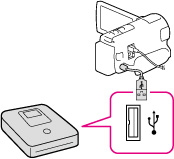
-
Select [USB Connect] on the camcorder screen.
If the [USB Select] screen does not appear, select 
 [Setup] [
 Connection] [USB Connect].
[Setup] [Connection] [USB Connect].-
Record movies on the connected device.
-
After the operation is completed, select
 .
.
Notes
-
Always maintain the firmware of the Sony DVDirect (DVD Writer) to its latest version. For details, see the following website.
http://sony.storagesupport.com/
