
 Operation Search
Parts and controls
-
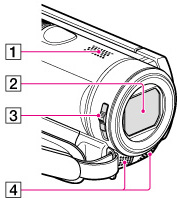
Speaker
-
Lens (Carl Zeiss lens)
-
LENS COVER switch
-
Built-in microphone
HDR-CX190E
HDR-CX200E/CX210E

HDR-PJ200E


-
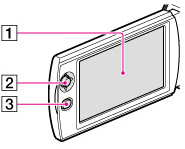
LCD screen/Touch panel (HDR-CX200E/CX210E/PJ200E)
If you rotate the LCD panel 180 degrees, you can close the LCD panel with the LCD screen facing out. This is convenient during playback operations.
-
Multi selector (HDR-CX190E)
-
 (View Images) button (HDR-CX190E)
-
PROJECTOR FOCUS lever (HDR-PJ200E)
-
Projector lens (HDR-PJ200E)
HDR-CX190E

HDR-CX200E/CX210E

HDR-PJ200E
-
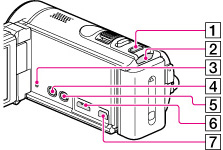
MODE button
-
 (Movie)/
  (Photo) lamp
-
RESET button
Press RESET using a pointed object.
Press RESET to initialize all the settings including the clock setting.
-
(View Images) button (HDR-CX200E/CX210E/PJ200E)
-
PROJECTOR button (HDR-PJ200E)
-
HDMI OUT jack
-
 (USB) jack
HDR-CX190E

HDR-CX200E/CX210E/PJ200E
-
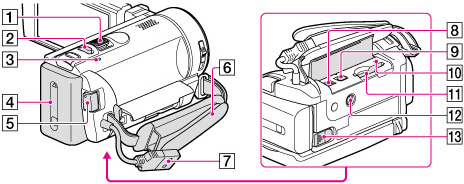
Power zoom lever
-
PHOTO button
-
CHG (charge) lamp
-
Battery pack
-
START/STOP button
-
Grip belt
-
Built-in USB Cable
-
DC IN jack
-
A/V Remote Connector
-
Memory card access lamp
-
Memory card slot
-
Tripod receptacle
Attach a tripod (sold separately: the length of the screw must be less than 5.5 mm (7/32 in.))
-
BATT (battery) release lever
To fasten the grip belt

