
 Operation Search
Turning the power on, and setting the date and time
-
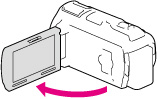
Open the LCD screen of your camcorder and turn the power on.
-
You can also turn on the camcorder by pressing POWER.
-
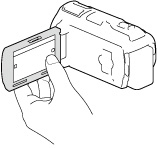
Select the desired language, then select [Next].
-
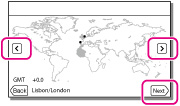
Select the desired geographical area with
 /
/ , then select [Next].
-
Set [Summer Time], select the date format and the date and time.
-
If you set [Summer Time] to [On], the clock advances 1 hour.
-
When you select the date and time, select one of the items and adjust the value with
 /
/ .
.
-
When you select
 , the date and time setting operation is complete.

To change the language setting

 [Setup] [
 General Settings] [Language Setting] a desired language.
To turn off the power
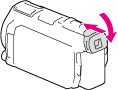
On turning the camcorder on or off using the LCD screen or the viewfinder (HDR-CX730E/ CX740VE/ CX760E/ CX760VE/ PJ740VE/ PJ760E/ PJ760VE)
|
Status
|
Power of the camcorder
|
|
|
LCD screen
|
Viewfinder
|
|
|
Open
|
Retracted
|
On
|
|
Pulled out
|
On
|
|
|
Closed
|
Retracted
|
Off
|
|
Pulled out
|
On
|
|
-
Even if the LCD screen is closed, if the viewfinder is pulled out, the camcorder is not turned off. When you turn off the power of the camcorder, make sure that the viewfinder is retracted to the original position.
When you make recording with the viewfinder only (HDR-CX730E/ CX740VE/ CX760E/ CX760VE/ PJ740VE/ PJ760E/ PJ760VE)
 ) and close the LCD panel and then adjust the angle you want (
 ). If the indicator on the viewfinder appears blurred, adjust the appearance using the viewfinder lens adjustment lever located on the above of the viewfinder.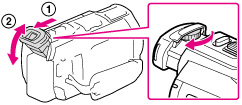
To adjust the angle of the LCD screen
), and then adjust the angle ().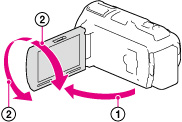
-
The recording date, time and condition, and coordinates (HDR-CX740VE/ CX760VE/ PJ710VE/ PJ740VE/ PJ760VE) are recorded automatically on the recording media. They are not displayed during recording. However, you can check them as [Data Code] during playback. To display them, select
[Setup] [ Playback Settings] [Data Code] [Date/Time].
-
Once the clock is set, the clock time is automatically adjusted with [Auto Clock ADJ ] and [Auto Area ADJ] set to [On]. The clock may not be adjusted to the correct time automatically, depending on the country/region selected for your camcorder. In this case, set [Auto Clock ADJ ] and [Auto Area ADJ] to [Off] (HDR-CX740VE/ CX760VE/ PJ710VE/ PJ740VE/ PJ760VE).
