
 Before Use
Picture Effect
Allows you to shoot a still image with an original texture according to the desired effect.
-
Set the mode switch to
 (Still Image).
-
Turn the control wheel to select
 (Picture Effect). [Details]
-
If you want to select other Picture Effect mode, select from MENU.
-
If you want to add effects to movies, press the MOVIE (Movie) button.
 (HDR Painting) (HDR Painting) |
Allows you to shoot multiple images with different exposures to create a single image that looks like an oil painting. You can change the effect level using MENU
 [HDR Painting effect]. [HDR Painting effect].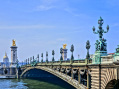 |
 (Rich-tone Monochrome) (Rich-tone Monochrome) |
Allows you to shoot multiple images with different exposures to create a single, sharp monochrome image.
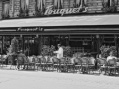 |
 (Miniature) (Miniature) |
Allows an image to be processed so that it looks as though you were shooting dioramas. One part of the image is blurred for a high-contrast image. You can change the blurred part using MENU
[Area of emphasis].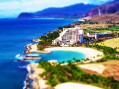 |
 (Toy camera) (Toy camera) |
Allows you to shoot images with effects such as tunnel effect, high contrast, or color cast as if they were shot with a toy camera. You can change the color hue using MENU
[Color hue].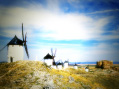 |
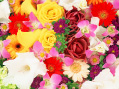
 (Pop Color) (Pop Color) |
Allows you to shoot a pop art-like colorful image with emphasis on the color tone.
 |
 (Partial Color) (Partial Color) |
Allows you to shoot an image that makes a strong impression by leaving a specified color on portions of a monochrome image. You can select the color to extract using MENU
[Extracted Color].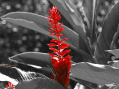 |
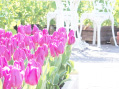
 (Soft High-key) (Soft High-key) |
Allows you to shoot soft, clear images with an emphasis on brightness.
 |
 (Watercolor) (Watercolor) |
Allows you to shoot an image with ink bleed and blurring effects as if it painted with watercolors. You can change the effect level using MENU
[Watercolor Effect].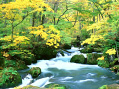 |
 (Illustration) (Illustration) |
Allows you to shoot an illustration-like image by emphasizing the outlines. You can change the effect level using MENU
[Illustration Effect]. |
Notes
-
The following Picture Effect modes are also effective for movies and Dual Rec shots.
-
[Toy camera]
-
[Pop Color]
-
[Partial Color]
-
[Soft High-key]
-
When the mode switch is set to
 (Movie), you cannot set the Picture Effect.
Related Topic
