
 Before Use
White Balance Shift
Allows you to use the selected white balance as the base value and apply the set correction value to change the color and record an image.
-
MENU

 (White Balance Shift) desired mode

-
When using for the first time, set the correction value to [Shift Amount Adjust].
 |
(Off) |
Does not use [White Balance Shift].
|
|
|
 (On) (On) |
Uses [White Balance Shift].
|
|
|
 (Shift Amount Adjust) (Shift Amount Adjust) |
Sets the correction value.
If you set a correction value, [White Balance Shift] will be set to [On] automatically.
|
Set the White Balance Shift correction value
-
MENU
(White Balance Shift) [Shift Amount Adjust]
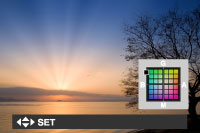
Set the correction value using  /
/ /
/ /
/ .
.
///.
|
Operation
|
Action
|
|
/
|
G (Green) and M (Magenta) provide fine adjustments such as those achieved with a color correction (CC) filter.
|
|
/
|
B (Blue) and A (Amber) provide fine adjustments in the color temperature.
|
-
If you set the [White Balance Shift] to [On] for the previously set correction value, it can be recalled.
Related Topic
