
 Before Use
List of icons displayed on the screen
List of shooting mode icons
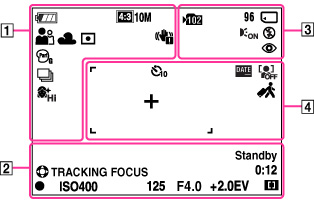
|
Display
|
Indication
|
 |
Battery charge remaining
|
 |
Low battery warning
|


 |
Image size/Panorama image size/Movie size
|


 |
Picture Effect
|


 |
Scene Selection
|


 |
Shooting mode
|


 |
Scene Recognition icon
|


 |
White Balance
|

 |
Metering Mode
|
 |
Vibration warning
|


 |
Color hue
|


 |
Extracted Color
|

 |
DRO
|
 |
Cont. Shooting Settings
|


 |
Soft Skin Effect
|
 |
Smile Detection Sensitivity indicator
|

 1.4 1.4
 |
Zoom scaling
|
|
Display
|
Indication
|
 |
Tracking focus
|
 |
AE/AF lock
|
|
ISO400
|
ISO number
|
|
125
|
Shutter speed
|
|
F4.0
|
Aperture value
|
|
+2.0EV
|
Exposure Compensation
|

 |
AF range finder frame indicator
|
|
REC
Standby
|
Recording a movie/Movie standby
|
|
0:12
|
Recording time (m:s)
|
|
Display
|
Indication
|
 |
Recording folder
|
|
96
|
Number of recordable images
|
|
100Min
|
Recordable time
|

 |
Recording media (Memory card, internal memory)
|
 |
AF Illuminator
|


 |
Flash mode
|
 |
Red-eye reduction
|
 |
Flash charging
|
|
Display
|
Indication
|


 |
Self-timer
|
 |
Write Date
|
 |
Face detection
|
 |
Destination
|


 |
AF range finder frame
|
 |
Spot metering cross-hairs
|
List of viewing mode icons
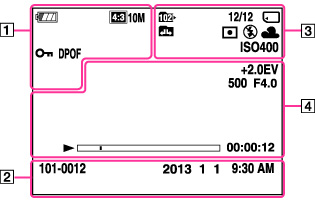
|
Display
|
Indication
|
|
|
Battery charge remaining
|
|
|
Low battery warning
|
|
|
Image size/Panorama image size/Movie size
|
 |
Protect
|
 |
Print order (DPOF)
|
 2.0 2.0 |
Playback zoom
|
|
Display
|
Indication
|
|
101-0012
|
Folder-file number
|
|
2013-1-1
9:30 AM
|
Recorded date/time of the playback image
|
|
Display
|
Indication
|
 |
Playback folder
|
|
12/12
|
Image number/Number of images recorded in selected date range, folder
|
|
|
Playback media (Memory card, internal memory)
|


 |
Changing folders
|
|
|
Metering Mode
|

|
Flash mode
|

|
White Balance
|
|
ISO400
|
ISO number
|
|
Display
|
Indication
|
|
+2.0EV
|
Exposure Compensation
|
|
500
|
Shutter speed
|
|
F4.0
|
Aperture value
|
 |
Playback
|
 |
Playback bar
|
|
00:00:12
|
Counter
|
 |
Volume
|
