
 Before Use
Scrolling panoramic images for display
You can scroll panoramic images by pressing the center button on the control button while panoramic images are being displayed.
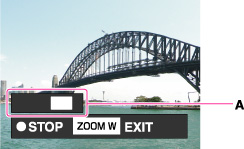
A: Shows the displayed area of the whole panoramic image
|
Control button
|
Action
|
 on the control button on the control button |
Starts scrolling playback/pauses scrolling playback
|
 / / / / / / on the control button on the control button |
Scrolls images
|
|
W side of W/T (zoom) lever
|
Displays the whole image
|
-
Panorama images recorded using another camera may not scroll correctly when played.
