
 Operation Search
Obtaining a map of the current location (triangulation priority mode) (Models with GPS)
This feature is useful for checking a map of your current location while traveling.
-
Select

 [Setup] [
 General Settings] [Your Location].
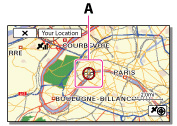
A: A marker that indicates your current location
Notes
-
If you select a certain point on the screen, the map shows an area with that point at the center. Select
 to move your current location back to the center again.
-
If the camcorder cannot acquire current location information, the triangulating information appears.
-
If the camcorder cannot obtain current location information, a marker which indicates the location last acquired is displayed on a map. If the location information that was previously obtained is invalid, the marker does not appear.
Related topics
Information on your camcorder model: Model Information
