
 Operation Search
Checking the triangulating status (Models with GPS)
The camcorder displays the status of the GPS signal reception when you are unable to obtain the triangulating information.
-
Touch
 on [Your Location] screen.
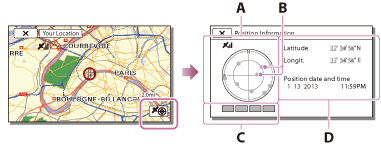
A: Satellite map
B: Satellite icons
C: Triangulating gauge
D: Information on the previously obtained location
On the satellite map and triangulating gauge
The center of the satellite map shows your current location. You can check the direction (north/south/east/west) of the satellites with the satellite icons ( ) that appear on the satellite map.
) that appear on the satellite map.When the camcorder succeeds in triangulating your location, the triangulating gauge turns to green.
How to check the GPS satellite icons/triangulating gauge
The color of the GPS satellite icons and the triangulating gauge change according to the current status of triangulation.
|
GPS satellite icons/triangulating gauge
|
Status
|
 / / (black) (black) |
No signal, but orbit information for the satellite is available.
|
 / / (gray) (gray) |
Part of the satellite orbit information has been obtained.
|
 / / (brown) (brown) |
About a half of the satellite orbit information has been obtained.
|
 / / (ocher) (ocher) |
Most of the satellite orbit information has been obtained.
|
 / / (green) (green) |
Triangulating is completed and the satellite is currently being used.
|
If data on your current location cannot be obtained
A display that allows you to triangulate the location again appears. In this case, follow the instructions that appears on the LCD screen.
Related topics
Information on your camcorder model: Model Information
